

WhatsApp for Divi
The Divi Pixel WhatsApp Chat module lets visitors message your team on WhatsApp in one click. Add a floating or inline chat button, show who is online, and start every conversation with the right person.

Divi 5 Ready
Custom Divi Module
Turn visitors into WhatsApp conversations
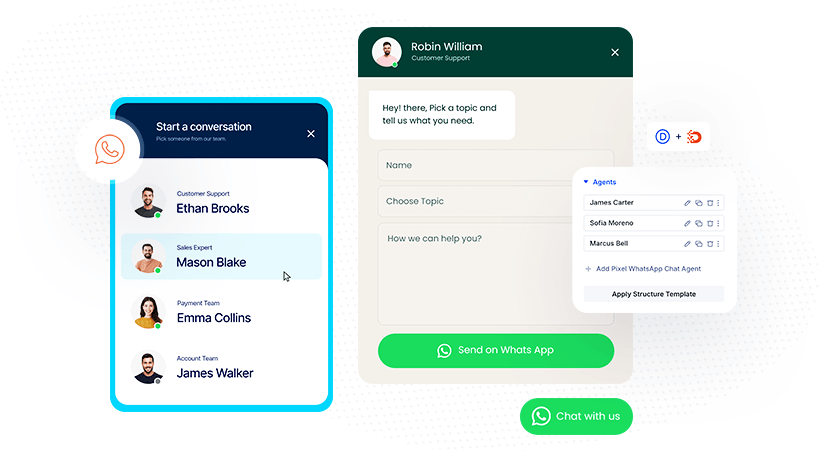
Greet visitors with a friendly chat box, let them pick a topic and type their question, and hand it off to WhatsApp with everything already filled in. Add each team member with their own number and hours, and when nobody is online, visitors can still leave a message.
Built for Better Conversations
Packed With Smart Chat Features
Control the whole experience, from the first click to the first reply. Every option lives right in the Divi Builder, no code needed.

Multiple Agents
Add your whole team. Visitors pick the right person from a list, each with their own WhatsApp number.

Greeting Message
Welcome every visitor with a friendly chat bubble that starts the conversation before they type.

Floating or Inline
Pin a floating button to any corner of the screen, or place an inline button right inside your layout.

Availability
Set working days and hours per agent. Outside them, show an offline note or still allow chatting.

Topic Field
Add a dropdown of topics like Sales or Support, so every chat arrives already sorted.

Online Status
A green or amber dot shows at a glance who is available right now and who is away.

Message Template
Pre-fill the message with the visitor’s name, text and the page they came from.

Agent Avatar
Put a face to every name. Add a photo, name and role, so visitors know who they are talking to.
FLOATING CHAT
One Agent, Always in Reach
A floating WhatsApp button stays in the corner on every page, with a badge that draws the eye. One click opens a chat box with a friendly greeting, name and message fields. Start Chat opens WhatsApp with the message already written.


Team Chat
Multiple Agents
Add your whole team, each with their own WhatsApp number, photo and role. Visitors pick the right person from a list, so sales questions go to sales and support requests go to support. A green dot shows who is online right now.
Topic Field
Every Chat Arrives Sorted
Add a topic dropdown to the chat form, so you know what each conversation is about before you reply. Use your logo as the avatar and match the button, header and fields to your brand colors.

Design Freedom
Styled to Fit Any Site
Black and white, rounded or sharp, subtle or bold. Every part of the widget has its own design settings in the Divi Builder: the button, header, greeting, fields and send button. It looks like part of your site.
Availability
Working Hours per Agent
Set the days and hours each agent is available. Outside them, the status dot turns amber, the header shows when you’re back, and a custom greeting tells visitors when to expect a reply. They can still leave a message.






Chat Form
Collect the Right Details
Show field labels and mark fields as required, so every request comes with a name, topic and message. Visitors choose a department first, and a back arrow takes them to the list. The send button label fits your business, like “Send Request” here.
Enhance your Divi Theme with Custom Settings and New Modules. Start Creating Awesome Websites with Divi Pixel
We offer a 14 Day Money Back Guarantee, so joining is Risk-Free!