

Conversation for Divi
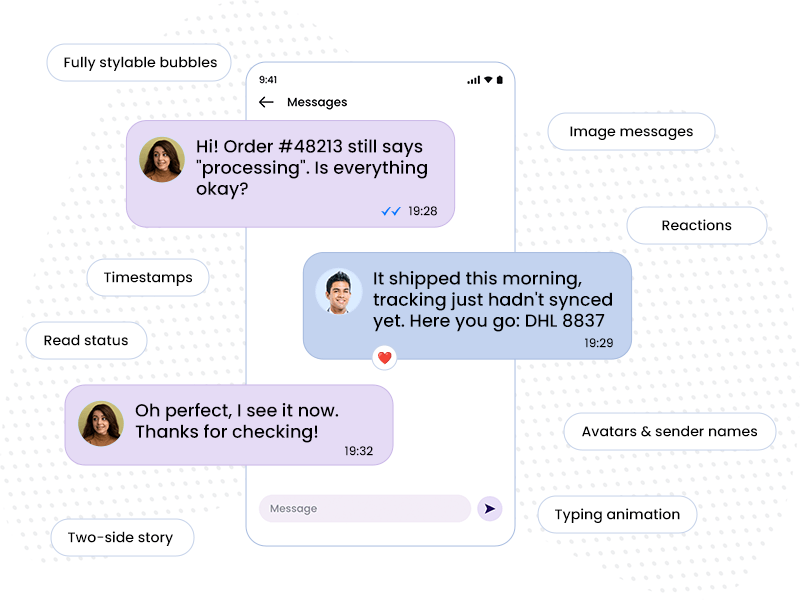
Build realistic chat conversations that type themselves out as visitors scroll. iOS, Android, WhatsApp and Messenger skins, typing indicators, read receipts, reactions and image messages – all inside the Divi Builder.

Divi 5 Ready
Custom Divi Module
Tell Your Story One Message at a Time
Pixel Conversation turns a plain list of messages into a living chat. Each message is its own child module, so you control the sender, avatar, timestamp, read status, reactions and images per bubble. Pick a device skin, enable typing animation, and the conversation plays out message by message as it scrolls into view. Perfect for product stories, support, testimonials and onboarding.
Customer Support Chat
Show Your Support in Action
Let visitors see how fast and friendly your team responds. A short support exchange builds more trust than a "24/7 Support" badge ever could.


iOS Style


Material Style



Blue Messenger
Green Messenger
Book, Confirm, Done
Ideal for restaurants, salons and local services. Walk visitors through the exact conversation they'll have with you and remove any doubt about how easy it is.
Avatars and sender names
Put a face and a name on every reply. Real people, not a faceless helpdesk.
Reactions
Add ❤️, 🔥 or any emoji to a bubble. One tap of approval says more than a paragraph of copy.
Scroll-triggered playback
The conversation starts when it enters the viewport and can replay every time it comes back into view.


Typing animation
Messages appear one by one with a live typing indicator, so the chat unfolds like a real conversation.
Two-sided story
Flip any message left or right. Show the customer's question and your answer side by side, exactly like a real sales chat.
Read status
show sent, delivered and read states on any bubble to signal fast, attentive replies.
Sell Through Conversation
Product Recommendation with Images
Mix text bubbles with image messages to show products the way people actually share them. Reactions and read receipts make the exchange feel spontaneous and real.
Image messages
Drop a product photo straight into the chat. Pick any image from the Media Library, it renders as a native photo bubble.
Fully styleable bubbles
Colors, radius, shadows, fonts, spacing. Match brand or keep native WhatsApp green. Every option in familiar Divi Design tab.

Proof that reads real
Client Testimonial
Skip the quote-in-a-box. A short back and forth with a happy client reads like a real recommendation from a friend, not marketing copy.
Support in action
Onboarding Walkthrough
Explain your product step by step as a friendly chat instead of a wall of text. Turn on replay and the walkthrough runs again every time it scrolls back into view.

Enhance your Divi Theme with Custom Settings and New Modules. Start Creating Awesome Websites with Divi Pixel
We offer a 14 Day Money Back Guarantee, so joining is Risk-Free!