

QR Code for Divi
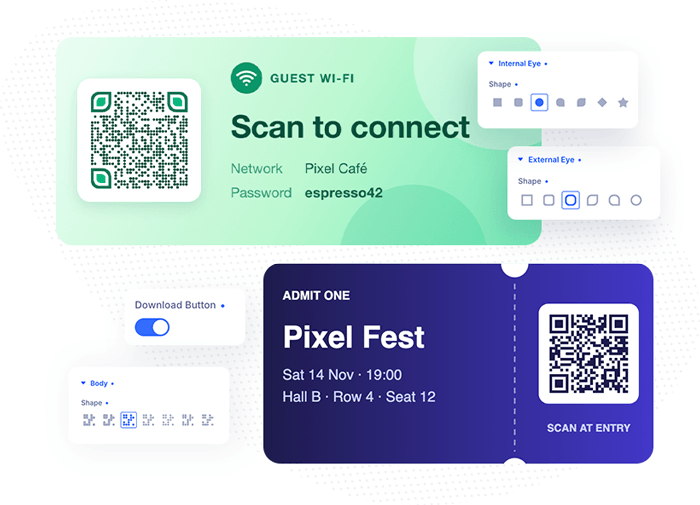
Create fully customized, branded and downloadable QR codes directly on your website. Easily generate QR codes with custom shapes, eye styles, vibrant colors, unique frames, and your own logo in the center to perfectly match your brand identity.

Divi 5 Ready
Custom Divi Module
Turn any link into an on-brand QR code
Link to a page, a phone number, an email address or your Wi-Fi login, and style the code to match the rest of your site. Choose how much error correction it gets, so it still scans with your logo in the middle or when it’s printed small.
Custom Divi Module
Pixel QR Code
On-brand QR codes, built right into Divi 5. Pick body and eye shapes, paint every part with colors, gradients or images, drop your logo in the middle and wrap it in a frame. It stays editable: change the link any time, even with dynamic content.
7 body shapes, 6 outer and 7 inner eye shapes
Divi backgrounds on every layer
Logo in the middle, sized to stay scannable
8 frame styles, or your own frame image
One-click PNG download

A single code, centered
The module takes the width you give it: here 300px, centered in a full-width column, with the classic “Scan me” label frame.
Seven body shapes
The data modules can be squares, connected rounded blobs, dots, small squares, diamonds or vertical and horizontal lines. Four per row, then three per row.
Outer and inner eyes
The three finder patterns are two layers of their own: shape and background for the outer ring and for the centre. Six per row on desktop, three on tablet, two on phones.
Eight built-in frames
Borders, corners, labels and speech bubbles, all drawn in one frame colour that scales with the module. Label frames carry their own text with the full Divi font options.
Border
Rounded border
Corners
No frame, card style
Label top
Speech bubble bottom
Speech bubble top
Label bottom
Bring your own frame
Upload any image as the frame, then place the code on it with QR Code Size and Horizontal / Vertical Position (responsive, in %). The frame image gets the usual Divi image options: rounded corners, borders, shadows, filters.


Logos that still scan
Every level adds error correction. The logo size is capped per level (Smallest 15%, Medium 20%, High 25%, Best 30%) and the modules behind it are cleared, so the code always stays readable. Each code below asks for 30%.

Smallest (L)
logo capped at 15%
Medium (M)
logo capped at 20%
High (Q)
logo capped at 25%
Best (H)
logo capped at 30%
Every Divi background, on every layer
Body, outer eyes, inner eyes and the code background each use the native Divi background options: colours, linear and radial gradients, images, even videos.
Gradient body
4-stop linear gradient · hover to download
Image body
photo as background image
Transparent background
sits right on the section
Links, calls, Wi-Fi, contacts
The content field takes any text: URLs, phone numbers, emails, Wi-Fi logins, geo locations or a full vCard. Longer content simply makes a denser code.
Call us
tel:
mailto:
Wi-Fi
WIFI:
SMS
SMSTO:
Location
geo:
Contact card
vCard
Café & hotel
Guest Wi-Fi in one scan
Put your network in the content field as WIFI:T:WPA;S:name;P:password;; and phones join with a single scan. White speech-bubble frame, dotted body, circle eyes and a logo, all at the Best level so it survives a coffee stain.
Restaurants & cafés
Menus, wine lists and pay-at-table
Label frames turn a code into a little table card. Same module, three moods: deep green, burgundy and espresso, each with its own label and logo.
Menu
label top · logo · Best level
Wine list
dots · circle eyes
Pay at the table
drop eyes · gold centre
Social
Follow-us codes in brand colours
No brand logos needed: a gradient body and matching eyes are enough to make a code recognisable at a glance.
Instagram style
3-stop gradient body
YouTube style
red body, dark eyes
LinkedIn style
classic squares
TikTok style
cyan and pink eyes
vCard
A business card that saves itself
Put a vCard into the content field and phones offer to add the contact right away: name, title, company, phone, email and website. The code stays fully editable in the builder whenever the details change.
Card style: white module background, 28px corners and a soft indigo shadow, label frame with “Save contact”, logo at the Best level.
After dark
Neon frames for bars, clubs and gigs
A frame colour, a glow box shadow on the module and a matching outer eye. The code itself keeps a white background, so it scans in the dark.
Club night
glow #22d3ee
Happy hour
glow #f472b6
Live music
glow #a3e635
Last orders
glow #facc15
Stickers
Tilted, playful, alive on hover
Divi’s own transform options work on the whole module: each card is rotated a few degrees and straightens up and grows on hover.
Rotated -6deg
straightens on hover
Rotated 4deg
straightens on hover
Rotated -3deg
straightens on hover
Rotated 7deg
straightens on hover
Posters, name badges and packaging
Three more custom frames. The code sits exactly on the white area of each artwork, scaled and placed in percent so it follows the image at every screen size.

Sale poster
40% · 72.5% / 72.7%

Conference badge
50% · 50% / 64.4%

Product sticker
37.5% · 50% / 48.75%
Any size
From hero to footnote
The code is vector-sharp at every size. On the left 480px wide with a 34px quiet zone, below six codes at 110px. Use Divi’s sizing options per breakpoint, the frame and logo scale along.
Hover the big code: a pink download button sits centred on its bottom edge and saves the code as a PNG, gradient and logo included.
110px
square
110px
dots
110px
rounded
110px
small squares
110px
diamonds
110px
lines
Minimal
Quiet, monochrome, no clutter
Transparent code backgrounds, greys instead of black and thin corner frames. Perfect for portfolios and editorial layouts.
Corners
grey on transparent
Dots only
no quiet-zone padding
Hairline border
light frame colour
Lines
vertical body
Photo fills
Fill the modules with a photo
Body, eyes or both use a background image. A dark Divi gradient overlay on top of the photo keeps the contrast high enough to scan.
Architecture
photo + dark gradient overlay
Garden house
photo + dark gradient overlay
Adventure
photo + dark gradient overlay
Events
RSVP, agenda, live stream
Speech-bubble frames point to the code and tell people what they get before they scan.
RSVP
bubble top · pink
Agenda
bubble bottom · indigo
Live stream
star eyes · teal
Ready to scan?
This page is built from one module: Pixel QR Code for Divi 5. Point your phone at the code to visit Divi Pixel.
Inverted
light modules on dark: most modern scanners read it
Enhance your Divi Theme with Custom Settings and New Modules. Start Creating Awesome Websites with Divi Pixel
We offer a 14 Day Money Back Guarantee, so joining is Risk-Free!