

Particle Effects for Divi 5
Snow drifting over your hero. Confetti on a thank-you page. A connected network of dots behind your pricing table. Add an animated particle layer to any Divi 5 section, row, column or module — pick a preset, and you’re done.

Divi 5 Ready
Unleash Creativity
Bring your Divi pages to life
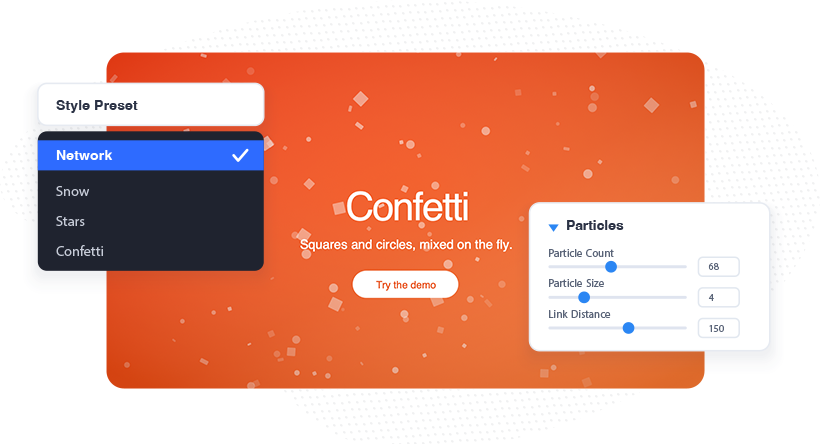
Particle Effects turns any element into a canvas: 25 ready-made styles — Snow, Stars, Confetti, Meteors, Black Hole — or build your own from shape, color, movement, link lines, collisions and mouse interactions. All inside the Visual Builder, with a live preview. No CSS, no extra module, no third-party library.
Built for real pages
Particles sit over a hero photo or behind a pricing table without touching the content itself. Clicks pass straight through, text stays readable, and the layer never becomes a background you have to design around.
Everything Included
One feature, endless scene
Particle Effects ships with everything you need to design an effect that fits your page, not a generic canned animation.
25 Ready-Made Presets
Snow, confetti, meteors — finished in one click.
Works on Every Element
Sections, rows, columns and modules alike.
Live Preview
Every change renders instantly while you edit.
10 Particle Shapes
Circles, squares, stars, emoji, images or text.
Up to Five Colors
Fixed palette, or animate through the wheel.
Link Lines Polygon Mesh
Connect particles into networks and filled meshes.
Mouse Interactions
Eight hover behaviours, six click actions.
Physics & Collisions
Particles bounce, absorb each other, or vanish.
Motion Effects
Twinkle, wobble, rotation, 3D tilt and roll.
In Front or Behind
Layer above content; clicks always pass through.
Built to Stay Fast
Loads only when used, pauses off screen.
Emitters & Trails
Meteors, comets and hyperspace streaks included.
Respects Reduced Motion
Static image for motion-sensitive visitors, automatically.
Divi Global Colors
Particles follow your global color palette.
Copy & Paste Styles
Reuse an effect across elements in seconds.
Particle Effects
Particles react to your visitors. Move the cursor and they scatter, swell, slow down or reach out with connecting lines; click and they multiply. Twenty-five ready-made styles ship with the feature, and every one of them can be tuned per element in the Visual Builder.
25 Tyle Presets
A finished look in one click
Every preset is a complete effect, ready to use the moment you pick it. Start from one and change nothing, or adjust a single setting and leave the rest as it is — a preset fills in only the options you haven’t touched.
Snow
Network
Bouncy Balls
Stars
Bokeh
Hyperspace
Confetti
Color Shift
Meteors
Rain
Emoji Rain
Comet Trails
Three Steps
From blank section to finished effect
1
Turn the feature on
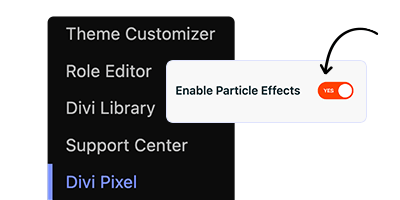
Go to Divi → Divi Pixel → General and enable Particle Effects. You only do this once.
2
Open any element
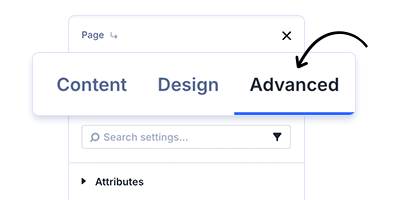
Hover a section, row, column or module in the Visual Builder, open its settings and switch to the Advanced tab.
3
Enable and choose
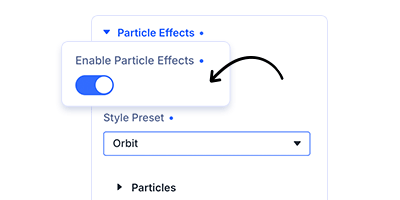
Toggle Enable Particle Effects, pick a Style Preset, and adjust anything you like. The preview updates as you go.
Good to know
Questions, answered
Enhance your Divi Theme with Custom Settings and New Modules. Start Creating Awesome Websites with Divi Pixel
We offer a 14 Day Money Back Guarantee, so joining is Risk-Free!