

Background Effects for Divi
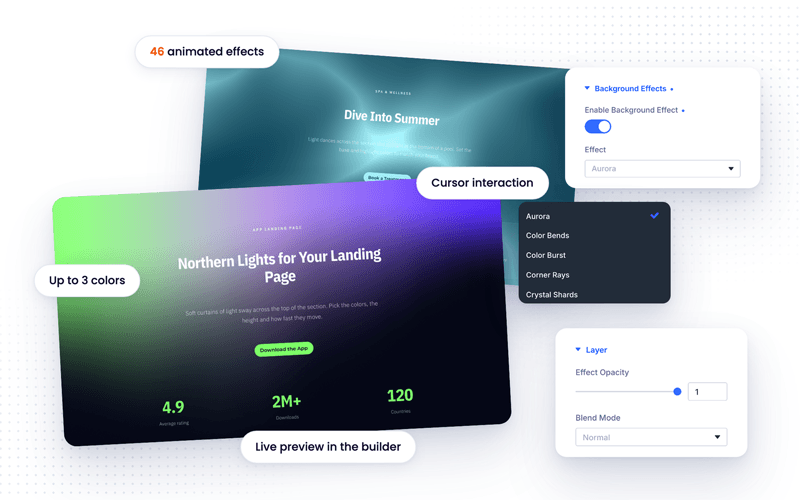
Give any section, row, column or module a living background. Choose from 46 animated effects, from soft auroras and starfields to fluid ink and glowing grids, set your colors and watch them react to the cursor, all inside the Divi Builder.

Divi 5 Ready
Divi Pixel Feature
46 animated backgrounds for any element
Background Effects adds a new group to the Advanced tab of every Divi 5 section, row, column and module. Switch it on, pick an effect, set up to three colors, the speed and how strongly it follows the cursor, and see the result live in the Visual Builder. Effects only load on pages that use them, pause when they scroll out of view, and hold still for visitors who prefer reduced motion.
SAAS HERO
Launch Your Next Big Idea
A deep starfield drifts and slowly turns behind your headline. Move your cursor across the section and the stars step aside.
Launch in minutes
Go from sign-up to your first project before your coffee gets cold.
Secure by default
Encrypted data, single sign-on and daily backups on every plan.
Grows with you
From a solo founder to a team of hundreds, without switching tools.
Effect: Galaxy · Cursor Repulsion on
PRODUCTIVITY
Everything Your Team Needs in One Place
Fine threads wave gently behind the copy and bend toward the cursor, a calm effect that works on a white section.
Effect: Threads · Color 1 #f05c12, Effect Opacity 0.55

APP LANDING PAGE
Northern Lights for Your Landing Page
Soft curtains of light sway across the top of the section. Pick the colors, the height and how fast they move.
Average rating
Downloads
Countries
Effect: Aurora · default colors
INTERACTIVE
The People Behind the Pixels
A small studio of designers and developers who sweat the details. Move your cursor across the section and watch the grid follow along.

Lena Hoffmann
Turns rough ideas into clean, bold brands. Believes every pixel should earn its place.

Lara Reid
Builds fast, accessible Divi sites and makes the tricky interactions feel easy.

Aiko Tanaka
Maps every click before it happens, so visitors always know where to go next.
Effect: Dot Grid · light section, orange Active Color
Pre-order bonus
A free accessory for everyone who orders before launch day.
Free shipping
Delivered to your door, wherever you are.
30-day returns
Not in love with it? Send it back, no questions asked.
PRODUCT LAUNCH
Ride the Next Wave
Layered waves roll toward a glowing horizon. The effect brings its own sky color, so the section needs nothing else.
Effect: Gradient Waves · its own sky background
EVERY ELEMENT
Works on Sections, Rows, Columns and Modules
Each card below is a column with its own effect. Add one to a single module, like a button or a pricing table, just as easily.
Silk
Folds of shimmering fabric on a column.
Plasma
Two colors melting into each other.
Iridescence
A pearly sheen that ripples under the cursor.
EVENTS
Live on Stage This Friday
A beam of light rises through the section and bends toward the cursor. Perfect behind a speaker, a countdown or a ticket button.
Doors at 7 PM
Live music from 8 PM until late.
Main Hall
Seated and standing tickets available.
12 artists
Three stages, one unforgettable night.
Effect: Light Pillar · Mouse Interaction 20
Worldwide network
Pick-up and delivery in over 200 countries.
Live tracking
Know where every parcel is, every minute.
Insured shipments
Every package covered from door to door.
LOGISTICS
Shipping Made Simple
A grid of hexagons glides diagonally across the section, and the cells under the cursor fill with color.
Effect: Moving Grid · Hexagons, Diagonal
SPA & WELLNESS
Dive Into Summer
Light dances across the section like sunlight at the bottom of a pool. Set the base and highlight colors to match your brand.
Massage
Deep tissue, hot stone and aromatherapy.
Pool & sauna
A heated pool, a sauna and a steam room.
Yoga
Morning and evening classes for every level.
Effect: Light Ribbons · teal base, aqua highlight
THE FULL COLLECTION
All 46 Effects
Every effect below runs live with its default settings. Scroll through, move your cursor over them, and click the ones that react to clicks.
Aurora
Color Bends
Color Burst
Corner Rays
Crystal Shards
Dither Waves
Dot Grid
Fiber Tunnel
Flowing Lines
Fluid Ink
Galaxy
Glow Band
Glow Orb
Glyph Waves
Gradient Blinds
Gradient Hills
Gradient Waves
Grainy Gradient
Grid Room
Image Distortion
Iridescence
Letter Glitch
Light Pillar
Light Rain
Light Ribbons
Light Threads
Lightning
Line Warp
Liquid Caustics
Moving Grid
Particle Field
Pixel Snow
Plasma
Psychedelic Swirl
Radar
Ripple Grid
Signal Scanner
Silk
Slatted Waves
Soft Aurora
Spotlight Rays
Square Corridor
Threads
Tile Motion
Topography
Wavy Lines
Three Steps
From any element to a finished effect
1
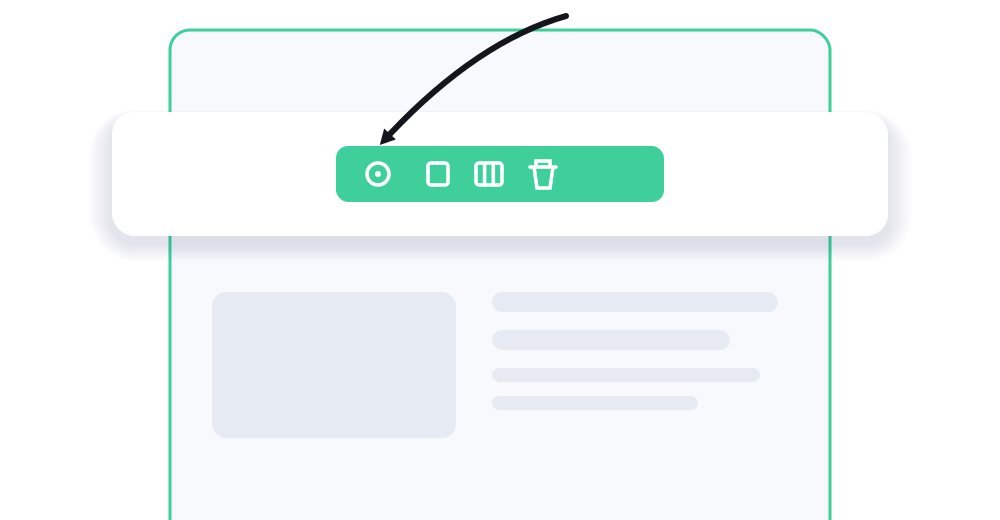
Open any element
Hover a section, row, column or module in the Visual Builder and open its settings.
2
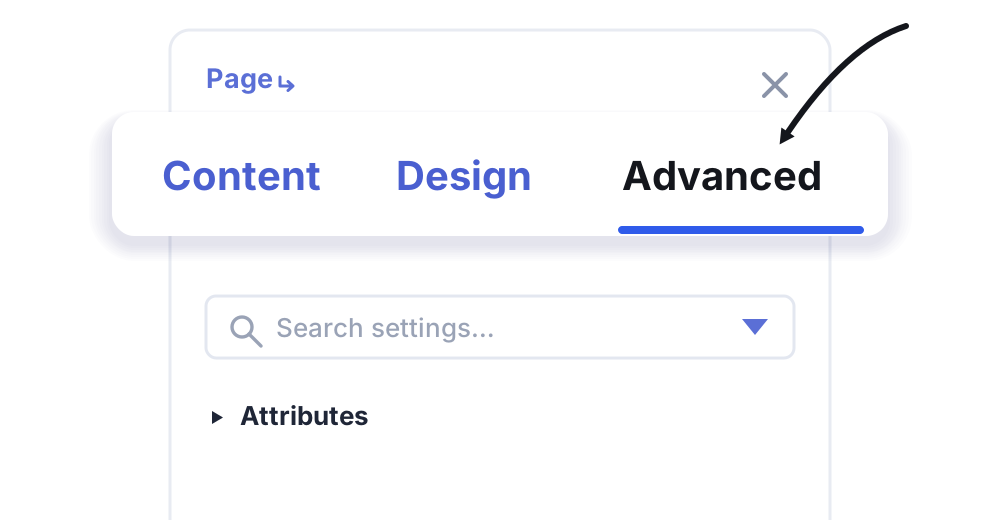
Go to Advanced
Switch to the Advanced tab and find the Background Effects group.
3
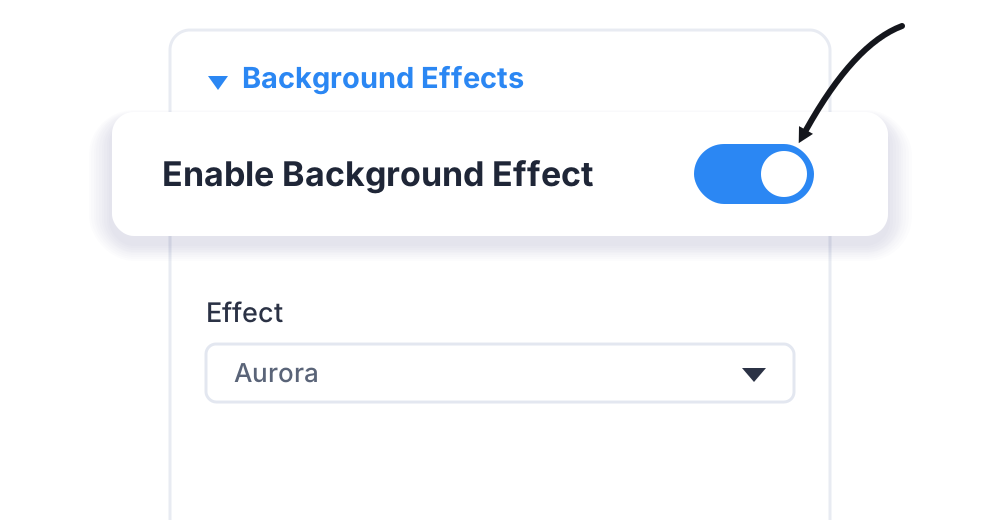
Switch it on
Toggle Enable Background Effect, then set the style, colour and size.
STILL WONDERING?
The short answers
Enhance your Divi Theme with Custom Settings and New Modules. Start Creating Awesome Websites with Divi Pixel
We offer a 14 Day Money Back Guarantee, so joining is Risk-Free!